



Big-Screen Simplicity for Colmar, PA Drives — Why the 2026 Chevrolet Trax LT’s 11-inch Display Feels Just Right
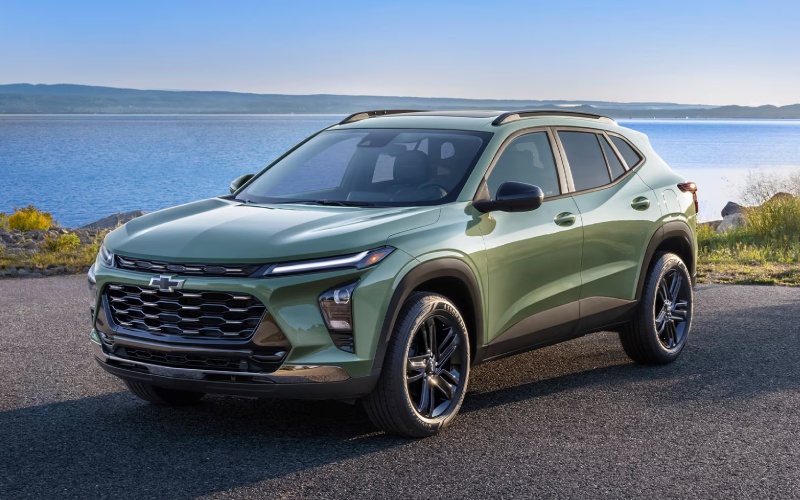
Patriot Chevrolet of Limerick – Big-Screen Simplicity for Colmar, PA Drives — Why the 2026 Chevrolet Trax LT’s 11-inch Display Feels Just Right
If you spend time along Bethlehem Pike, scooting between Colmar Station and errands closer to North Wales, the 2026 Chevrolet Trax offers a deceptively simple advantage: the available 11-inch center diagonal touch-screen on LT and above. It’s not about showing off; it’s about visibility, legibility, and calm. A bigger, clearer display makes routing, media, and settings easier to see at a glance, and that matters when real-life driving asks you to keep your attention forward. The Trax builds the right foundation with standard wireless Apple CarPlay® and wireless Android Auto™, then elevates everyday ease with the kind of crisp, intuitive interface that shortens the learning curve and reduces hunt-and-peck tapping. In short, it delivers tech that feels natural—exactly what you want when the day is already busy.
How a Larger Screen Lowers Daily Friction
A large, high-resolution touch-screen is more than eye candy. On Colmar, PA roads where traffic ebbs and flows and decisions come fast, extra screen real estate translates to larger tap targets and cleaner menus. That makes it simpler to follow turn-by-turn directions near busy shopping corridors, switch playlists at a long light, or confirm a quick settings change without diving into layered submenus. The available 11-inch system in the Trax LT and higher trims brings a sense of calm—your core apps are sized up just enough to reduce distraction and help you keep your head up and eyes forward.
Because wireless Apple CarPlay® and wireless Android Auto™ are standard, you don’t need to juggle cables when you hop in for a quick drive from Lansdale to Hatfield. Your phone stays in a pocket or bag, yet your key apps—maps, calls, messages, podcasts—are right where you expect them on the big display. Add the available wireless charging pad, and the whole setup becomes wonderfully low-maintenance for routine commutes and errand runs.
Designed for Real Use, Not Just Spec Sheets
The Trax’s cabin makes smart use of space around the display, too. The screen angles toward the driver, and core physical controls sit where your hand naturally rests, so you can make climate tweaks or volume changes by feel. That thoughtful design pairs nicely with the Trax’s smooth, predictable driving manners—quiet enough to hear a phone call clearly, composed enough to keep your focus on what’s ahead. And with an adult-friendly back seat plus a flat, wide cargo floor, you’re set for a quick grocery pickup near Montgomery Mall or a weekend bag run to the train.
What stands out is how quickly you feel at home. Whether you’re pairing a phone for the first time or scrolling through audio sources, the Trax’s interface responds snappily and mirrors your familiar phone gestures. It’s about minimizing moments of “Where is that?” or “Which menu was it in?”—small frustrations that add up on busy days.
Colmar-Friendly Features You’ll Appreciate
- Wireless from the start: standard wireless Apple CarPlay® and Android Auto™ reduce clutter
- Available big-screen clarity: the 11-inch center diagonal touch-screen scales up maps and media
- Simple organization: home screens keep top apps within easy reach
- Thoughtful controls: logical layout places key functions where your hand expects them
- Quiet composure: calm cabin makes calls and voice commands easier to catch
That thoughtful mix helps the Trax feel made for everyday life along 309—short hops with frequent stops, unexpected detours around roadwork, and the occasional quick sprint to beat a yellow. When the cabin’s technology stays out of the way and simply works, your overall drive feels smoother.
Which Trim Makes Sense for a Big-Screen Priority?
If the available 11-inch display is high on your wish list, the Trax LT is an ideal place to start. It adds the tech-forward touches many Colmar drivers want, and you can layer in available amenities like the 8-inch diagonal Driver Information Center for an even more complete digital cockpit. If you prefer a sportier vibe, look to 1RS and 2RS for unique design cues and larger wheels, or choose ACTIV if you favor a bold, outdoorsy look. All keep the Trax’s core strengths intact—confident visibility, flexible cargo space, and a footprint that’s easy to park near busy storefronts.
The good news is that the Trax keeps its feature story simple. Wireless smartphone integration is standard, so you’re already set for cable-free connectivity no matter which trim you choose. From there, stepping up to the larger screen is a straightforward move, and you’ll feel the payoff the first time you glance across the dash for a quick street name or an upcoming turn.
Everyday Tech Tips for Smoother Colmar Drives
- Customize your home screen: place navigation and audio front and center for faster taps
- Use voice commands: let your voice handle texts or song changes to keep eyes on the road
- Save frequent destinations: one-tap routing cuts time during busy mornings
- Pair more than one phone: the system remembers regular drivers for easy handoffs
A few minutes of setup pays off day after day. With your frequently used apps and destinations one tap away, the Trax’s tech fades into the background and supports you without fuss.
Frequently Asked Questions:
Does the 2026 Trax require a cable for Apple CarPlay® or Android Auto™?
No. The Trax includes wireless Apple CarPlay® and wireless Android Auto™ as standard, so you can connect without plugging in.
Which Trax trims offer the available 11-inch touch-screen?
The 11-inch center diagonal touch-screen is available on LT and offered across upper trims like 2RS and ACTIV, making it easy to prioritize a larger display.
Is the Trax’s tech easy to learn for first-time SUV buyers?
Yes. The menus are straightforward, and because smartphone mirroring is standard, most drivers interact with the same familiar apps they already use every day.
Can I add wireless charging?
Wireless charging is available. Pair it with standard wireless smartphone integration for a cord-free setup.
For drivers who prefer technology that streamlines rather than complicates, the 2026 Chevrolet Trax hits the sweet spot. It starts with the right standard features and gives you just enough room to tailor the experience—especially if you value that bright, straightforward 11-inch display. At Patriot Chevrolet of Limerick, we make it easy to compare trims and set up a test drive to see how the screen and controls feel in real use. We are proud of our approachable, local-first support—serving Colmar, Plymouth Meeting, and Hamburg—because the best tech is the kind you barely have to think about once you’re on the road.
0 comment(s) so far on Big-Screen Simplicity for Colmar, PA Drives — Why the 2026 Chevrolet Trax LT’s 11-inch Display Feels Just Right